Most creators treat sound as an afterthought; the ones winning watch time treat it as a system. The same visuals, cut the same way, can feel 2–4x more immersive and over 40% more memorable when the music, SFX, and mix are engineered for engagement.
We've updated the ScriptHooks Video Grader so it doesn't just judge what's on screen — it now evaluates how your video sounds too. In this post, you'll see the sound-design playbook we built from research, and how the new audio scoring and Sound Energy Arc help you actually apply it.
How the ScriptHooks Video Grader Works
ScriptHooks Video Grader analyzes your video across three dimensions — content, visuals, and audio — and uses AI to turn that into an actionable score and grade.
You upload a file or paste a YouTube link, pick your video type (from short-form social to long-form documentary), and the grader "watches" your video like a real viewer. It evaluates everything from hook strength and pacing to lighting, sound design, and emotional impact.
The standout feature is the Engagement Arc: a visual chart that maps your video's actual engagement curve against the ideal arc for your content type, plus a Sound Energy Arc that shows how your audio dynamics evolve across the timeline. You can instantly see where your video peaks, where it dips, and whether your sound design is reinforcing or fighting your story.
At the end, you get a letter grade, a breakdown of individual scores, and specific strengths and improvement suggestions — not generic advice, but targeted feedback that references exact moments in your video.
Engagement Arc + Sound Energy: See If Your Audio Is Pulling Its Weight
Every video you grade in ScriptHooks gets an Engagement Arc view that overlays the ideal emotional arc for your content type with your video's actual engagement curve. Below it, the Sound Energy panel tracks how loudness, music intensity, and SFX density rise and fall over time.
In a persuasion-style ad, for example, you'll see the classic Problem → Agitation → Solution → CTA arc plotted as the ideal path, with your own engagement and sound curves layered so you can spot exactly where your audio spikes too early, drops out during key moments, or fails to support the final call-to-action.
See It in Action: Amplitude's "What Will You Build?"
To show what this looks like in practice, we ran Amplitude's "What Will You Build?" spot through the Video Grader — one of the strongest product ads we've seen in the wild.
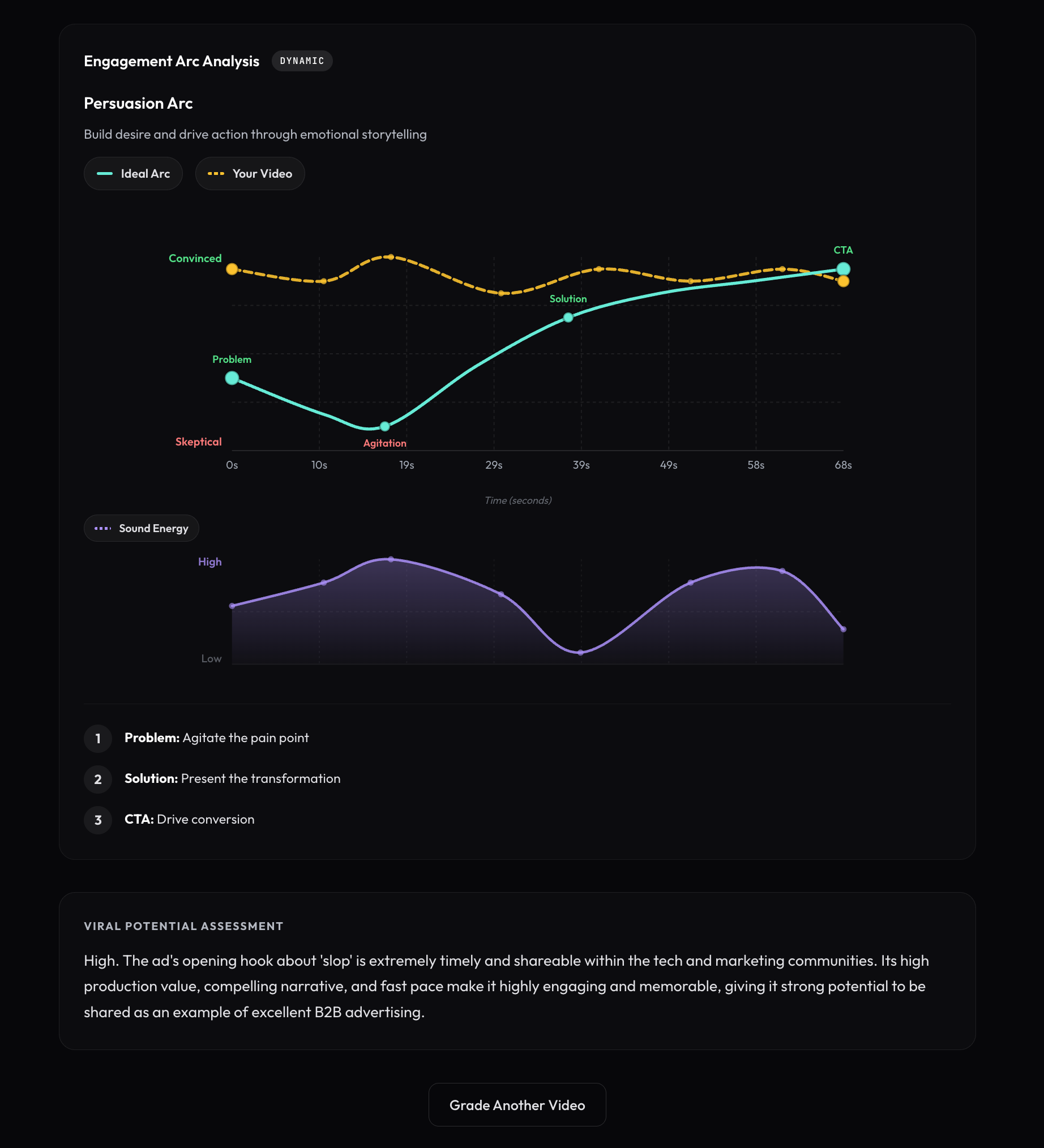
The Engagement Arc immediately tells the story. The amber "Your Video" line tracks tightly against the ideal Persuasion Arc, staying in the "Convinced" zone through nearly the entire runtime. But look at the Sound Energy panel below it — that's where things get interesting. You can see a clear dip in audio energy around the midpoint, which lines up with the ad's deliberate moment of silence before "So we started from scratch." That valley isn't a mistake; it's a textbook tension reset that makes the energy surge afterward hit harder. The sound arc confirms that the audio is actively driving the emotional journey, not just sitting underneath it.
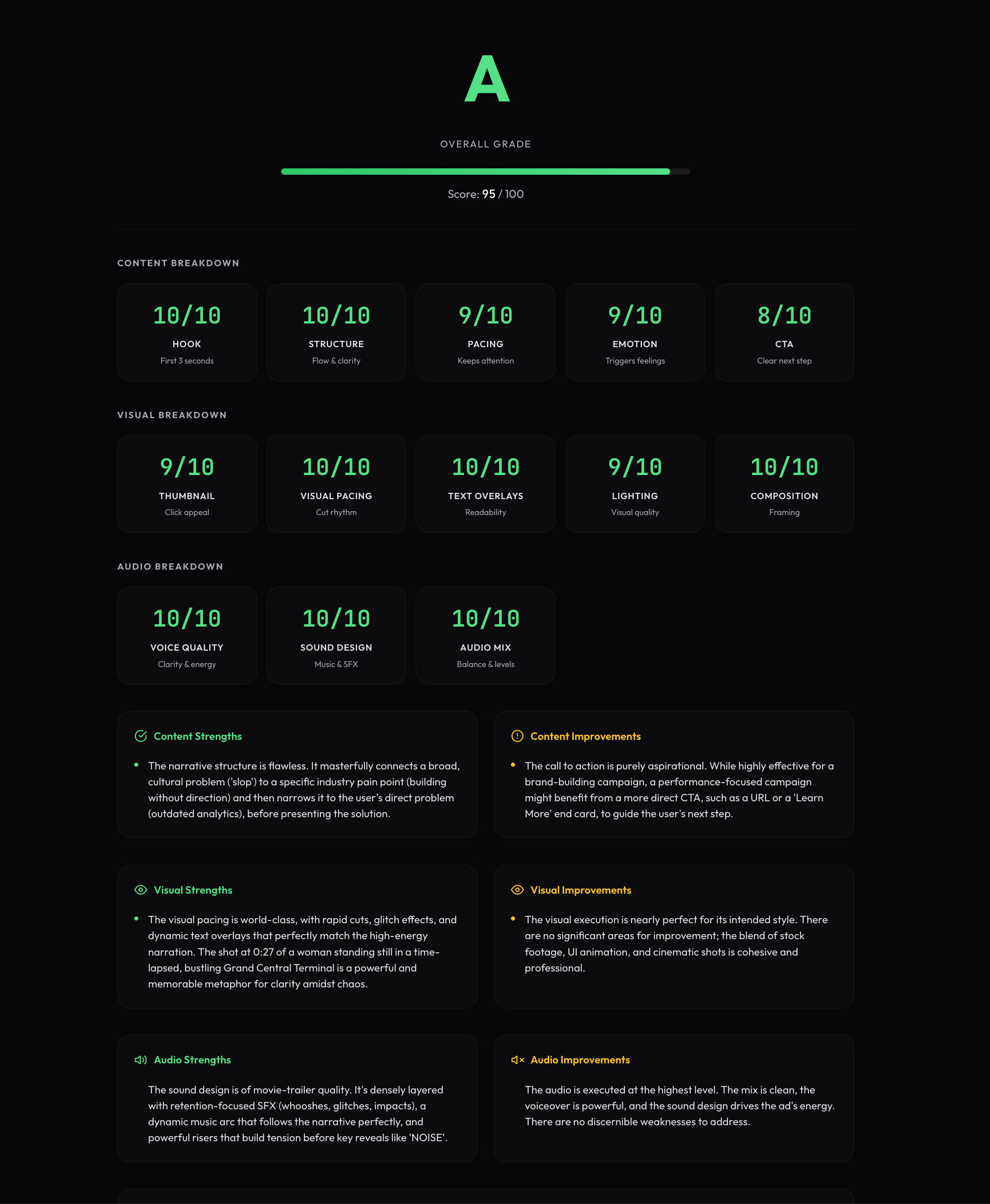
The scorecard backs it up: 10/10 across Voice Quality, Sound Design, and Audio Mix. The ad earned a 95/100 overall with an A grade — and the audio section is a big reason why. Densely layered SFX, a dynamic music arc that follows the narrative beat for beat, and powerful risers before key reveals all contribute to what our grader flagged as movie-trailer-quality sound design.
This is the benchmark. When you grade your own videos, the audio scoring is calibrated against executions like this — so a 9 or 10 genuinely means top-tier, not just "you added a song and some whooshes."
The Sound Design Playbook
1. Start With an Audio Plan, Not Just a Track
High-retention creators map the audio arc of their video against the emotional arc of the script before they ever drag in music. At a minimum, plan these stages:
- Hook (0–3s): Immediate energy that matches your visual hook — stingers, bold first lines, or even a silence-to-hit contrast.
- Build: Gradual increase in music intensity and SFX density as stakes rise.
- Valley: Deliberate drop in audio energy (softer bed or near-silence) to reset attention.
- Climax: Maximum intensity at the reveal or "aha," often after a micro-silence or riser.
- Resolve: Controlled de-escalation into your CTA so the viewer feels emotionally complete.
ScriptHooks uses this same structure to judge whether your sound arc actually follows the intended emotional arc for your chosen content type.
2. Use Sound Effects as Retention Glue
Sound effects are the invisible glue of retention editing: viewers don't consciously notice them, but they absolutely feel it when they're missing. The updated grader looks at three practical SFX jobs:
- Movement & transitions: Whooshes and swooshes on camera moves, section changes, and text fly-ins to carry momentum across cuts.
- Emphasis & impact: Hits, booms, and slams on stats, title cards, punchlines, and physical actions to punctuate importance.
- Emotional accents: Sparkles, record scratches, tape-stops, and satisfying pops that add mood and personality without overwhelming the mix.
Our audio rubric rewards variety, precision timing to visual events, and smart frequency layering; it downgrades generic, off-timed, or overused SFX that muddy the story.
3. Design Transitions to Eliminate Dead Air
Transitions are where viewers most often bail, because every cut is a moment where they silently ask, "Do I still want to watch?" The grader checks whether your audio bridges those gaps using a three-step pattern:
- Signal that a change is coming (riser, filter sweep, tonal cue).
- Bridge the cut with a whoosh, impact, glitch, or musical fill.
- Land in a new bed or ambience that clearly defines the next section's energy.
Videos that jump between sections with flat or mismatched audio get flagged, while those that sustain forward audio momentum score higher in the Sound Design and Engagement Arc categories.
4. Treat Music as a Storytelling Layer
The most engaging videos treat music as a dynamic storytelling layer that tracks the emotional arc of the content. ScriptHooks evaluates:
- BPM vs pacing: Whether your tempo matches cut speed and content type (e.g., 60–90 BPM for reflective stories, 100–140 BPM for vlogs and challenges).
- Track changes: If you change music at major chapter boundaries to avoid "same-y" fatigue.
- Beat alignment: How often cuts land on musical beats, especially in fast-cut content.
If your video rides one track the whole way or uses a tempo that fights the pacing, you'll see that reflected in both your Audio Mix score and the shape of the Sound Energy Arc.
5. Use Silence as a Strategic Weapon
In a world of constant sound, silence is one of the most powerful pattern interrupts you can use. Our rubric specifically looks for:
- Pre-reveal drops: 200–500ms of total silence right before a reveal or punchline, followed by an impact and new music.
- Emotional pauses: 1–3 seconds of silence after a heavy line to let it land.
- Section resets: 1–2 seconds of near-silence between major sections in longer content.
Well-placed silence contributes to higher Emotional/Narrative Impact and is visible as purposeful dips in the Sound Energy curve rather than random holes in your mix.
6. Short-Form = A Different Sound Language
Short-form platforms like TikTok and YouTube Shorts run on a different audio language than long-form YouTube. The grader adapts expectations by content type and looks for:
- High density of audio events (rarely more than 1–2 seconds with no variation).
- Aggressive layering — voice, music, SFX, and ambient sound all working together.
- Effective use of meme sounds, notification-like pings, and "brainrot" SFX for culturally fluent clips.
Short-form videos with flat or sporadic audio get penalized; those that maintain varied, on-brand chaos without masking the voice score higher.
7. Make the Voice King: Levels, Ducking, and Clarity
Whatever you're making, the human voice has to win the mix. ScriptHooks grades:
- Loudness compliance: Are you roughly in spec for your platform (e.g., around −14 LUFS integrated with true peaks near −1.0 dBTP)?
- Voice-music ratio: Is background music kept roughly 15–20 dB below dialogue peaks so speech stays intelligible?
- Clarity & EQ: Are you avoiding muddiness (200–800 Hz), managing sibilance, and keeping presence (1–2.5 kHz) clear?
Clean, intelligible dialogue with proper ducking and dynamics earns high marks; masked, muddy, or harsh voices pull your Audio Mix and Dialogue scores down fast.
The Rubric Behind Your Audio Scores
Under the hood, the grader uses a consolidated rubric so audio is judged with the same rigor as content and visuals.
| Dimension | What We Look At |
|---|---|
| Loudness compliance | LUFS vs platform norms, true peak, clipping |
| Dialogue clarity | Intelligibility, EQ balance, noise, consistency |
| Voice–music balance | dB separation, ducking/sidechain, masking |
| Sound design quality | SFX choice, timing, variety, frequency layering, emotional support |
| Technical mix quality | Noise floor, dynamics, stereo field, artifacts |
| Emotional/narrative impact | How well audio supports tension, release, and key emotional beats |
A Simple Checklist for Every Edit
Before you export — or before you run your next ScriptHooks Video Grader — run through this quick checklist distilled from our research:
- Does the first 3 seconds sound as strong as they look?
- Is there an audio change (SFX, music shift, ad-lib, silence) at least every few seconds appropriate to length?
- Do your transitions have deliberate audio bridges?
- Does your music follow a clear build → valley → climax → resolve arc?
- Is your voice always clearly on top of music and SFX?
- Is there at least one intentional silence before a major payoff?
- Are your loudness and peaks in range for your platform?
- Are you using enough variety in music and SFX to avoid fatigue?
That checklist is exactly what the upgraded grader is looking for — so when your score goes up, you know your sound design isn't just "nicer," it's structurally better for engagement.
Grade Your Video's Sound Design
Upload a video or paste a YouTube link. See how your audio scores — and where the Sound Energy Arc says you're leaving watch time on the table.
Open the Video Grader →
— The ScriptHooks Team
Building tools for creators who take their content seriously.