Setting up a brand kit on ScriptHooks used to mean opening five tabs and pasting URLs from each one. YouTube, TikTok, LinkedIn, Instagram, X. Most users gave up at three sources, which meant the Brand Voice Profile got built from a fraction of the available signal.
This release fixes that with a new feature called Bootstrap, alongside a full editorial redesign of Brand Kit and Strategy. Both are live now.
Bootstrap
Drop a brand domain or just the brand name. We'll use Gamma as an example. Bootstrap scans for every public presence: YouTube channels, TikTok profiles, LinkedIn company pages, LinkedIn founder profiles, Instagram accounts, X handles, and the homepage itself.
Every match comes back with a confidence score (high, medium, or low) so you can see which results actually belong to the brand before pulling anything in. Uncheck what doesn't fit. One click ingests the rest in parallel.
In testing, Gamma's brand kit went from 1,500 words of source material to 11,303 words in one click. That's the kind of jump that changes what the synthesis pass can actually do with the voice profile.
The practical effect on output: brand voice quality scales with source volume. A 5,000-word YouTube interview gives our synthesis a sharper read on tone, cadence, and recurring themes than 300 words of LinkedIn copy. Bootstrap removes the friction so you stop short-shrifting the brand kit and actually feed it real content.
Studio is now one connected workflow
Brand Kit and Strategy used to live as two separate destinations in the sidebar. With this release, they share a Studio surface with a sub-nav at the top:
1 Brand Kit → 2 Strategy
The arrow is intentional. Brand Kit is where you tune the inputs (sources, voice profile, custom vocabulary). Strategy is where you read the outputs (pillars, content calendar, competitive gaps). You can flip between them without losing context. The active brand kit name follows you across the surface.
Brand Kit vs Brand Brain: where each one fits
One question that comes up: how is the Brand Kit different from the Brand Brain? Both surfaces exist in Studio. They look related. They are, but they do different jobs.
Think about it like this: every brand has a control panel and a dashboard.
The Brand Kit is the control panel. Inputs. You connect a domain, you pull in their YouTube channel, their LinkedIn, their X handle. You tell the system what voice to write in. You set the words to always use, the words to avoid. You generate the voice profile. This is the surface you touch when you're tuning the brand.
The Brand Brain is the dashboard. Outputs. It looks at the kit, plus every script you've graded for this brand, plus the videos you've published, plus what your competitors are doing, and gives you a Brand Health Score out of 100. Voice Identity says are you actually writing in your stated voice, or have you drifted. Audience tells you who's watching. Performance shows what's working. Competitive Landscape shows where the white space is.
One sentence: Brand Kit makes the brain. Brand Brain reads the brand.
Brand Kit, redesigned
The Brand Voice Profile is now the editorial centerpiece of Step 4, not buried below the vocab form. Everything else on the page sits around it.
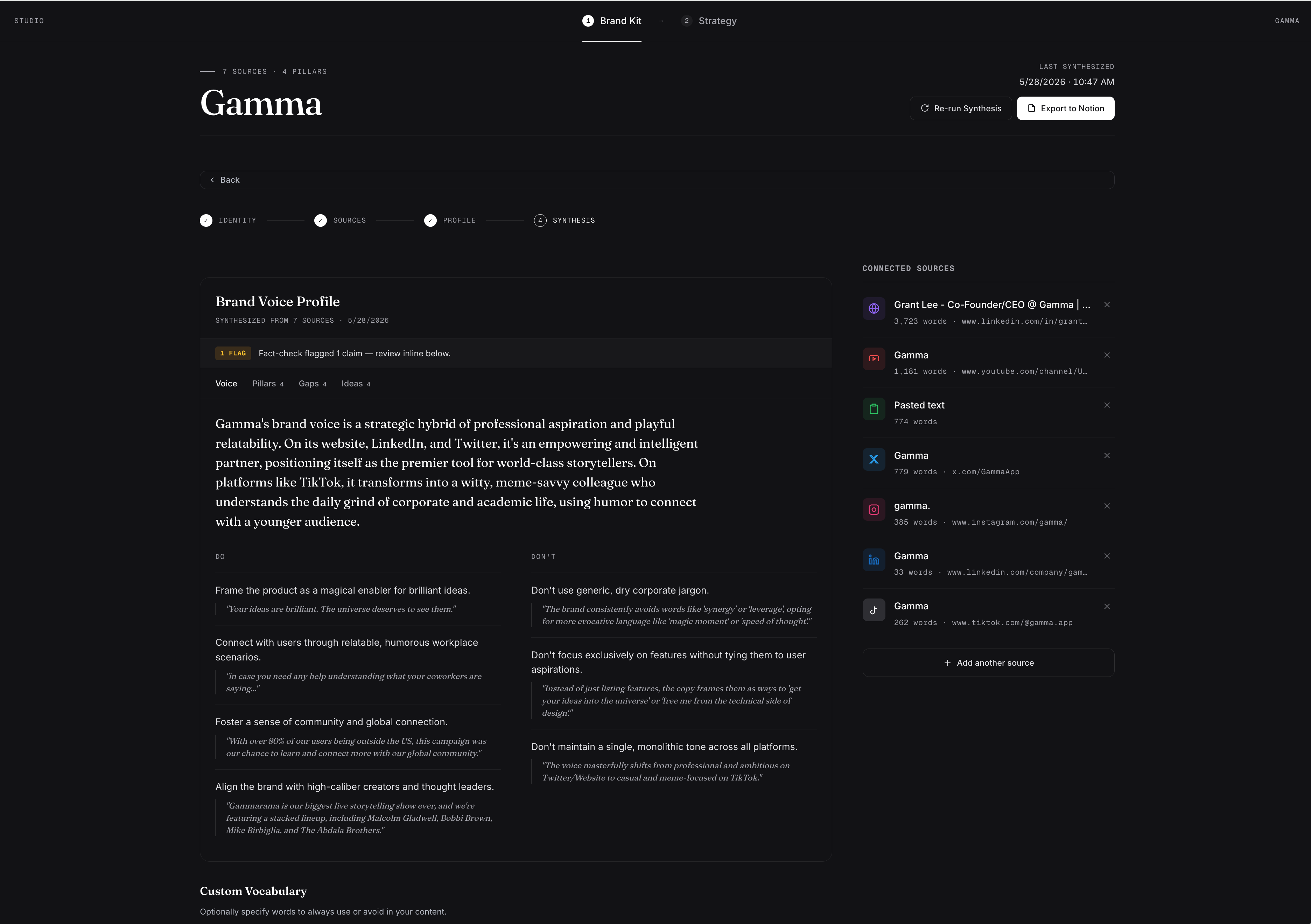
Inside the synthesis card, the old stack of six section blocks (Voice Summary, Do, Don't, Pillars, Gaps, Ideas) collapsed into four focused tabs:
- Voice. The summary, plus side-by-side Do and Don't rules with evidence quotes pulled from the actual source corpus.
- Pillars. Recurring themes the synthesis identified, ranked by evidence strength.
- Gaps. Topics absent from the brand's current corpus that adjacent creators are covering.
- Ideas. Specific script ideas grounded in actual source material, each citing the quote that inspired it.
The fact-check pill at the top of the card calls out flagged claims inline. Green when the audit found no fabricated names, dates, or events. Amber with the flag count when something needs review.
The Connected Sources rail uses real platform icons now (LinkedIn blue, YouTube red, TikTok mono, X blue, Instagram pink) so you can scan and confirm coverage at a glance. An "Add another source" button always sits at the bottom of the rail, so attaching new content is one click away regardless of which step you're on.
Strategy, redesigned
The Strategy page used to cram pillars, format mix, cadence, competitive gaps, and growth opportunities into a stacked left rail next to the calendar. Useful information, but reading it meant scrolling past a wall of cards.
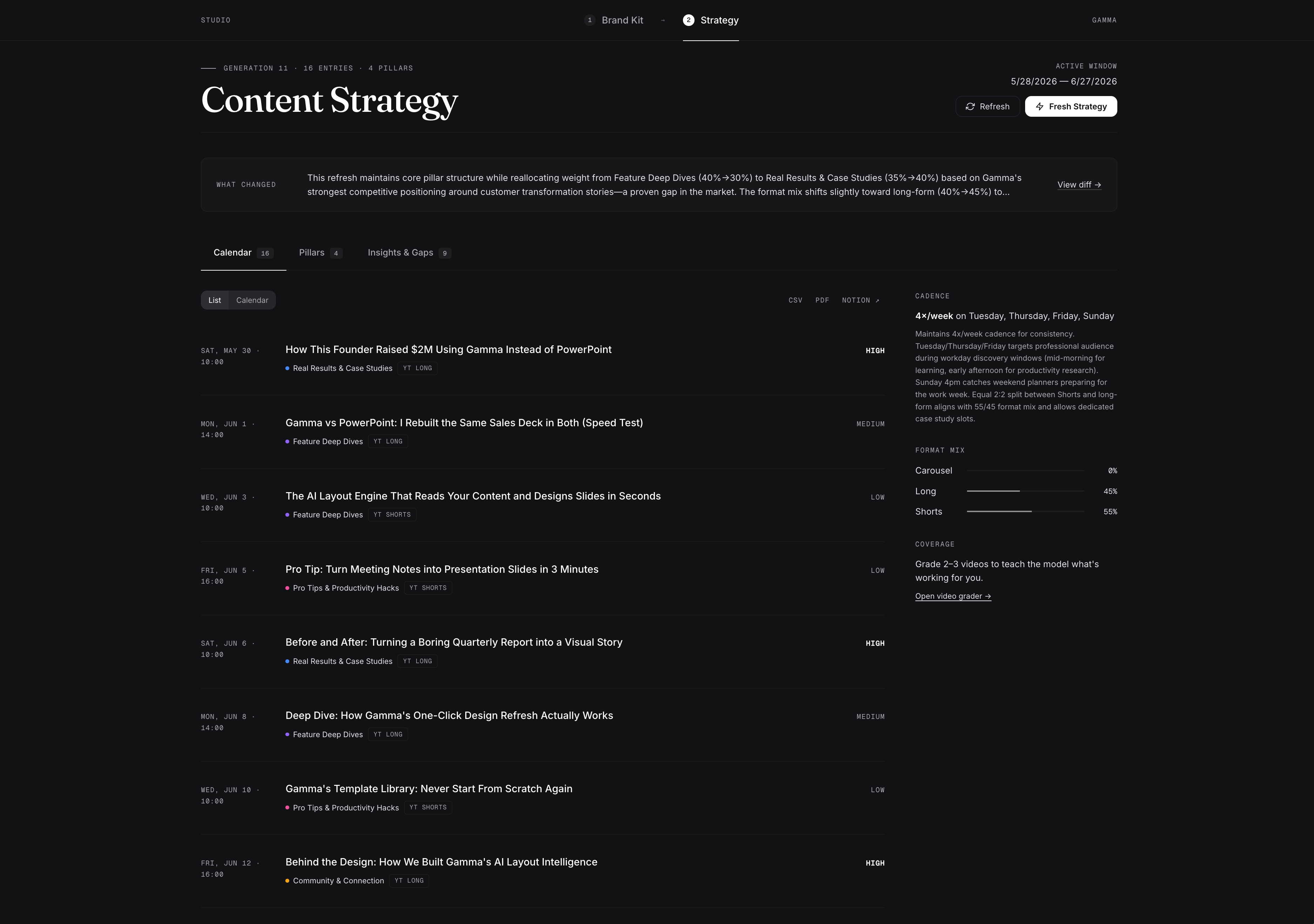
Three zone tabs replace the rail:
- Calendar. The default view. Quiet hairline rows with the date in mono on the left, title in the middle, and priority chip on the right. No more "idea" badges cluttering every row. Click any entry to expand the reasoning, hook suggestions, and production notes. A small at-a-glance rail on the right shows cadence, format mix, and grading coverage.
- Pillars. Pillars sorted by weight, each showing entry count and weight delta from the previous generation. Click a pillar to filter the calendar.
- Insights & Gaps. Competitive gaps and growth opportunities side by side, sorted by impact. Below them, the "What I'm Learning" block surfaces the insights the grading agent has picked up across your channel.
The information you need is the same. The way you consume it changed. One scroll became three deliberate views.
What changed under the hood
A few smaller changes worth mentioning:
- Editorial typography. Fraunces leads every title. Geist Mono carries metadata. Inter handles the body. The whole surface reads less like a SaaS dashboard and more like a working studio.
- Studio sub-nav is sticky. The Brand Kit / Strategy switcher stays visible as you scroll so the flow between inputs and outputs never gets lost.
- Quick action chips on the homepage are now full opacity. They were at 70% before, which made them feel disabled. They aren't.
- Custom vocabulary form moved below the synthesis card on Step 4. It's still there, just no longer the loudest element on the page.
What's next
On the roadmap:
- Bootstrap support for podcast feeds and Substack publications
- Pillar drag-and-drop reordering on the Strategy calendar
- A roll-up "Studio dashboard" landing view that shows both Brand Kit health and Strategy freshness at once
- Variation generation: same content idea, multiple hook angles, side by side
If something feels off or you have a feature request, reach out. We read everything.
Try Bootstrap
Open Brand Kit, click Create New, and paste your domain. Two minutes to a full brand voice profile.
Open Brand Kit →
- The ScriptHooks Team
Building tools for creators who take their content seriously.